

Prusa Releases Extension for Autodesk Fusion Integration with Printables and EasyPrint
Prusa has released a free plugin for Autodesk Fusion that connects the editor with Printables and EasyPrint, allowing users to find, modify, and send a model to print.
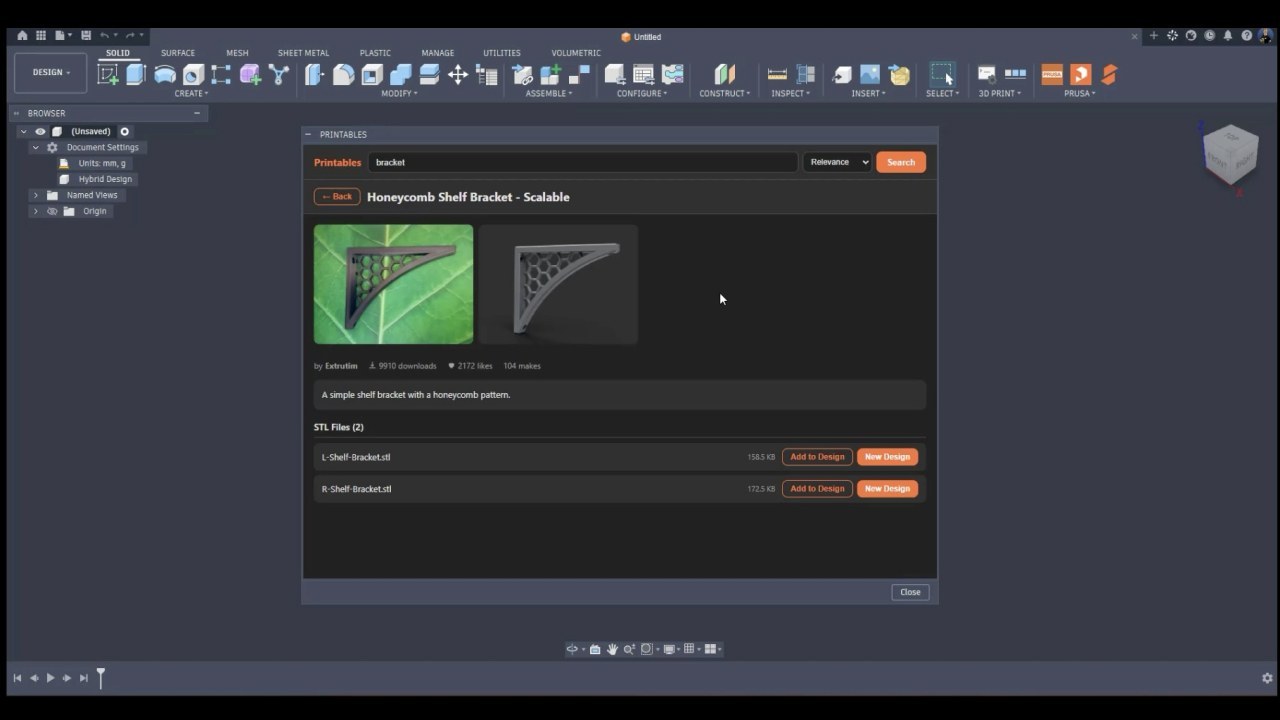
The extension adds a separate Prusa panel to the Design workspace. Using the Open Printables command, users can find a ready-made 3D model, upload a supported file into the current project, and modify its geometry using Fusion’s tools.
The Send to EasyPrint command transfers the model to the browser-based slicer. There, users can inspect the object, select materials and print quality, generate G-code, and send the task to a compatible printer via Prusa Connect or save the file. The slicer automatically adjusts the remaining parameters.
The Create Prusa Setup feature allows users to select a printer and print profile directly in Fusion. The plugin assembles the project bodies into a production model and opens the Manufacture workspace, where users can add supports, slice the object into layers, and prepare the file.
The extension is available in the Autodesk marketplace. It supports Prusa MK4S, CORE One+, XL, and MINI. An active Prusa account is required to use EasyPrint.